Secrets and Credentials in Automation: Where the Keys Live and Who Can Use Them
Unattended automation holds real keys to real systems. Where they are stored, how narrowly they are scoped, and how they are rotated decides how bad a leak can get.
Every useful automation is given the keys to something: an email account, a database, a payment provider, a CRM. It runs without a person watching, which means those keys sit somewhere, ready to be used at any hour. That makes them one of the more attractive targets in a business, and one of the most carelessly handled.
Most credential leaks are not clever attacks. They are keys committed to a repository, pasted into a chat, left in a shared spreadsheet, or baked into a script that was later copied. The defences are mostly ordinary discipline, applied consistently.
What counts as a secret
Anything that grants access: API keys, passwords, database connection strings, tokens, signing keys, webhook secrets, and certificates. Treat the whole category the same way, including the ones that look harmless, because a token for a “low-risk” service is often a stepping stone to a more important one.
Never put them in code or in the repository
The most common mistake is also the most avoidable. A key written into a source file is copied wherever the code goes: into version history, into backups, onto laptops, and into anyone else’s hands who can read the repository. Removing it later does not remove it from history.
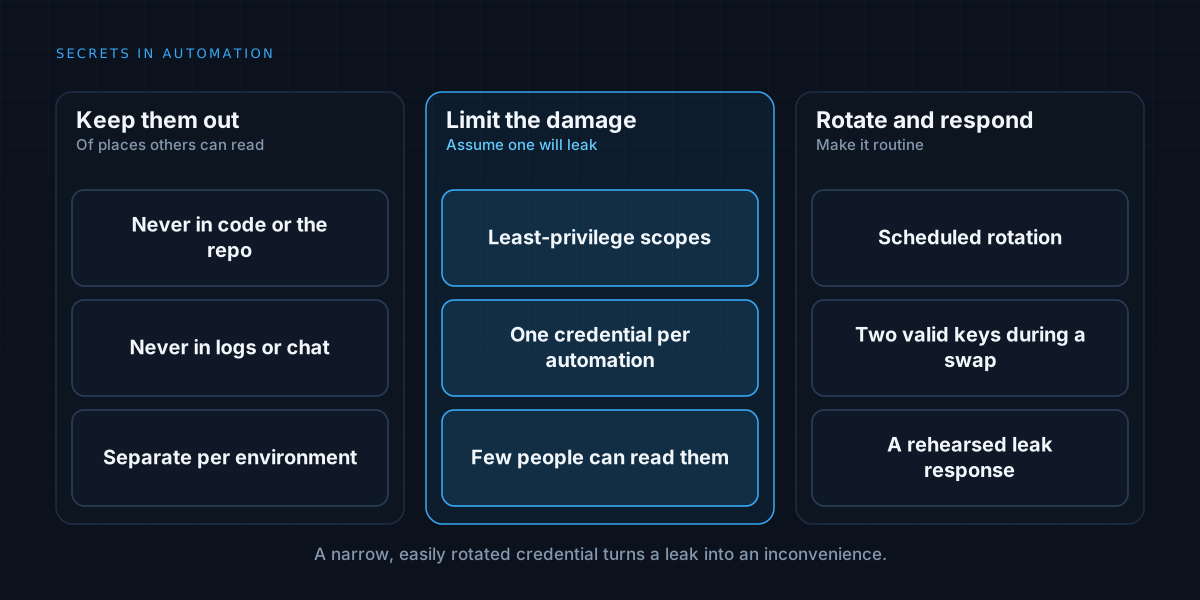
Keep secrets out of the codebase entirely. The code should read them from the environment or a secrets store at runtime. Add checks that block commits containing key-like strings, and assume that any secret that has ever been committed is compromised and must be replaced.
Use a proper store
Environment variables are a reasonable minimum. A dedicated secrets manager is better: it keeps secrets encrypted, controls who and what can read each one, records access, and supports rotation. Many hosting platforms provide one built in, and using it is usually simpler than inventing something.
Separate secrets by environment. Development, testing, and production should each have their own, so a mistake in a test cannot touch real data and a leaked development key does not open production.
Scope each credential narrowly
The question to ask of every key is: what is the worst thing it could do? Then reduce that. Create credentials with only the permissions the automation needs: read-only where it only reads, limited to one resource where possible, and restricted by network or IP where the service allows it.
A broad administrator key given to an automation because it was convenient is an accident waiting to happen. This is the same least-privilege principle as scoping an agent’s tools in MCP access control, and it matters more when the thing holding the key can be manipulated, as covered in prompt injection and AI agents.
Use separate credentials for separate automations. When each has its own, a leak is contained and you can tell which one was involved.
Rotate, and make rotation easy
Keys should not live forever. Rotate them on a schedule and immediately when someone leaves, a system is retired, or a leak is suspected. The practical obstacle is that rotation breaks things if you do it badly, so design for it.
Support two valid credentials at once during a changeover, so you can introduce the new one, switch the automation over, then retire the old. Keep the list of where each secret is used, so rotation does not miss a place. If rotating a key is painful, people avoid doing it, which is a sign the design needs work.
Limit who can see them
Access to production secrets should be restricted to the people and systems that genuinely need it, and not shared by default. Avoid shared logins; give each person and service its own identity so access can be revoked individually and traced.
Keep secrets out of logs. A request logged with its authorisation header, or an error message that prints a connection string, leaks the key into a place with a much wider audience. Redact sensitive values before they are written, and review what your logging captures, in line with the thinking in audit logs and compliance basics.
Handle third-party and user credentials carefully
If your automation acts on behalf of a customer, prefer delegated access, such as OAuth, to storing their passwords. It gives them control, lets them revoke access, and means you never hold the credential itself. Where you must store tokens, encrypt them, scope them, and delete them when the relationship ends.
Assume a leak will happen, and plan for it
Detection and response matter as much as prevention. Monitor for unusual use of credentials, such as new locations, spikes in volume, or access to things the automation never touches. Know in advance how you would respond: who revokes the key, how you find what it accessed, and how you replace it without extended downtime.
A rehearsed procedure turns a crisis into a checklist. And a narrowly scoped, easily rotated credential turns a leak from a disaster into an inconvenience.
Bring the same care to no-code tools
Credentials connected inside automation platforms are no safer for being behind a friendly interface. Review which accounts are connected, with what permissions, and who in the organisation can see or reuse them. This is one of the quieter risks when choosing between tools, as in no-code or custom automation.
When a simple approach is enough
A personal script with one low-value key can reasonably live with environment variables and a note to rotate it occasionally. The care should scale with what the key can reach. For anything touching customer data, money, or production systems, the discipline above is not optional.
We build automation that holds only the access it needs. See how we approach workflow automation, or read about durable pipeline design.