MCP Servers as the Access Control Layer Between an Agent and Your System
Giving an agent tools is not the same as giving it your API. An MCP server is where you decide, tool by tool, what it is actually allowed to do.
The pitch for “give the agent access to your system” usually skips a step. Access through what? A raw database credential, a full API key with every scope enabled, a service account nobody scoped down because scoping it down was extra work? That answer decides whether the agent has tools or just has your system.
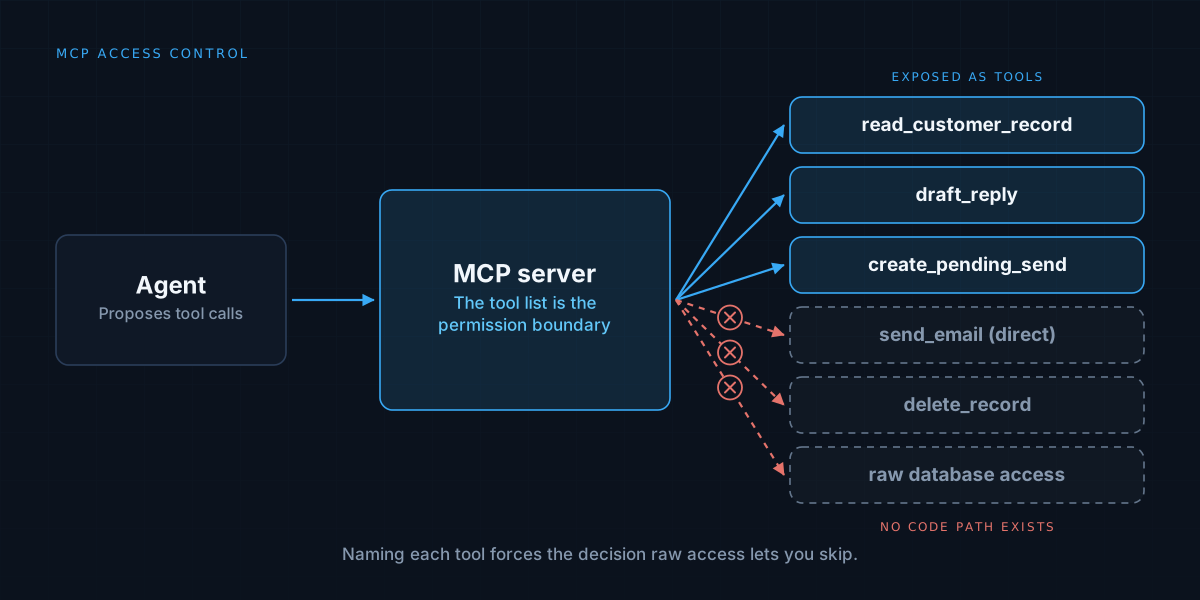
Model Context Protocol is one way to answer it properly. Not because the protocol itself does anything magical, but because building an MCP server forces a decision that raw access lets you skip: naming, one at a time, exactly what the agent is allowed to do.
A tool list is a permission boundary, not a feature list
An MCP server exposes a defined set of tools, each with a name, a schema, and a specific piece of logic behind it. “Read a lead record.” “Send a templated email to a specific address.” “List templates in a sequence.” Nothing on that list is “run arbitrary SQL” or “call any endpoint on this service,” because those were never written as tools. They cannot be called because they do not exist on the surface the agent sees.
That is a different thing from a system prompt telling the model which actions are appropriate. A prompt is a request the model can misread, forget, or override under adversarial input. A tool that was never defined cannot be called under any circumstance, because there is no code path that would execute it. This is the same distinction covered in AI agent guardrails: a constraint enforced in code holds regardless of what the model decides to attempt, and an MCP server’s tool list is exactly that kind of constraint, applied at the integration layer instead of inside a single action.
What this looked like for an outreach agent
We built exactly this for an internal outreach platform: sequencing, A/B variants, send-window throttling, all sitting on top of leads sourced from Google Maps and SAM.gov. The system needed an agent to inspect campaigns and trigger sends directly, and the obvious shortcut, a database connection the agent could query freely, would have handed it the ability to read every lead record in the system at once, edit send schedules directly, or bypass the rate limiter by writing straight to the table it reads from.
None of that was ever on the table. The MCP server exposes templates, leads, and send actions as specific tools: fetch a template, list leads matching a filter, trigger a send for one lead through the same code path a person would use from the dashboard. The rate limiter, the send-window check, and the state machine tracking each lead’s sequence position all still run, because the tool calls into the same application logic the UI calls into. The agent got a real interface to operate the system, not a side door around the parts of it that enforce the rules.
The schema is doing more work than it looks like
Each tool’s input schema is itself a constraint, not just documentation. A tool that takes a lead ID and a template ID, and nothing else, cannot be called with a freeform recipient address or an arbitrary message body, because the schema will reject anything that does not match. This closes off a category of misuse before it reaches any application logic at all: the agent literally cannot construct a call outside the shape you defined, the same way a typed function signature stops a caller from passing the wrong argument.
This is worth testing directly, not assuming. The evaluation discipline from how to evaluate an AI agent before you trust it applies here almost unchanged: build a set of cases where the agent should be refused by the schema or the underlying logic, and confirm it actually is, rather than trusting that a narrow tool definition behaves the way it reads on paper.
Where MCP does not replace the rest of the guardrail work
A well-scoped tool list stops the agent from doing things it was never meant to do. It does not, on its own, stop the agent from doing an allowed thing too often, at the wrong hour, or without a human checking first. Those are the rate limits, send-window checks, and approval gates sitting behind the tool, not the tool definition itself. MCP narrows what is callable. The logic behind each call still has to enforce everything else.
Treating the tool list as the entire safety story is the most common way teams undersell what still needs building. A tight set of tools with no rate limiting behind them is still an agent that can send a thousand emails in a minute, just through a narrower door than an open API would have given it.
We built exactly this kind of agent-facing interface for an outreach platform in production. See the Email Automator case study, or read about how we approach agent work.