Feature Flags: Shipping Code Without Shipping Risk
A feature flag separates deploying code from releasing a feature. Done well it enables gradual rollouts and instant rollback. Done carelessly it becomes clutter.
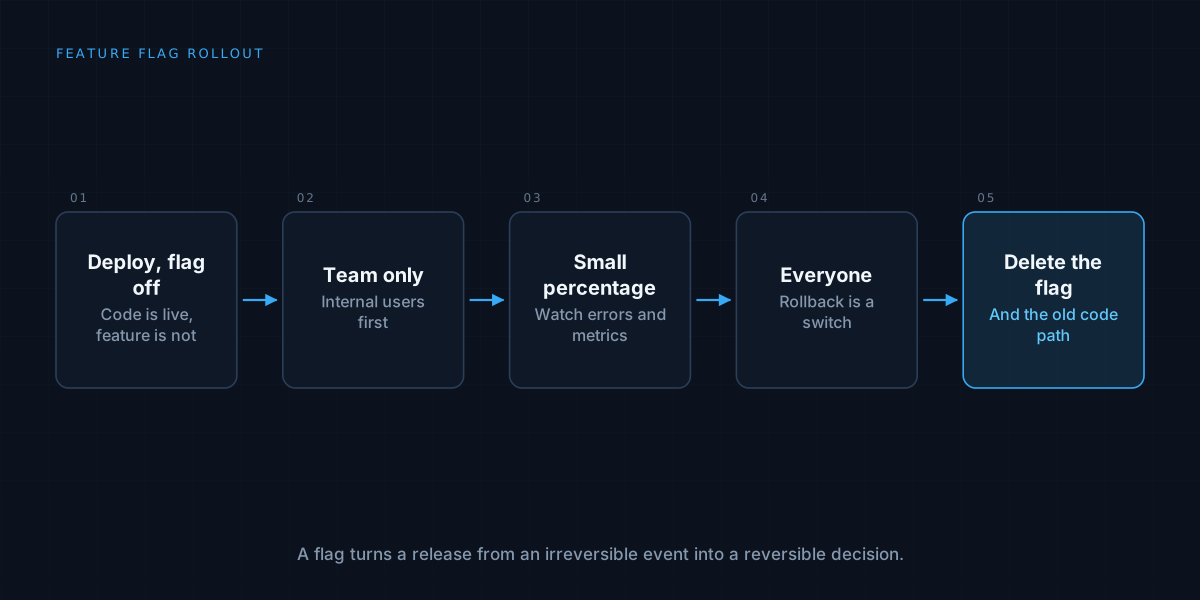
Most teams treat deploying code and releasing a feature as the same event. The code goes live, and so does the feature, to everyone, at once. If something is wrong, the fix is another deployment, under pressure, while users are affected.
A feature flag separates the two. The code is deployed, switched off. The feature is released later, deliberately, by flipping a switch that does not require another deployment. That small separation changes how safely a team can ship.
What a feature flag is
At its simplest, it is a conditional in the code that checks a setting: if the flag is on, show the new behaviour, otherwise show the old one. The setting lives outside the code, in configuration or a flag service, so it can be changed without redeploying.
That is all the idea requires. Everything else, such as percentage rollouts or targeting specific users, builds on this one decoupling of “the code exists in production” from “users can see it”.
What it gives you
The first benefit is incremental release. Instead of exposing a change to everyone at once, you turn it on for the team, then a small group of customers, then a growing percentage. Problems appear while the audience is small.
The second is instant rollback. If a feature misbehaves, you turn the flag off. There is no emergency redeployment, no reverting of code, and the recovery takes seconds. The ability to undo something quickly makes people willing to ship more often, which itself reduces risk.
The third is decoupling release from deployment schedules. Code can merge and ship continuously while the feature waits for the right moment: a marketing date, a customer’s readiness, or a dependency elsewhere.
Kinds of flags, and why they matter
Not all flags are the same, and treating them as one category is how clutter starts.
Release flags hide unfinished or newly shipped features and are meant to be short-lived. Once the feature is fully rolled out, the flag should go.
Experiment flags split users between variants to measure which performs better, and last as long as the test.
Operational flags are controls for running the system, such as switching off an expensive feature under load or disabling an integration that is failing. These can legitimately live for a long time.
Permission flags enable features for particular customers or plans. These are really part of the product’s entitlements and belong with that design, as in payments and billing architecture.
Knowing which kind a flag is tells you when it should be removed.
Roll out in stages
A sensible progression: internal users first, then a small percentage of real users, then more, watching the right signals at each stage. Choose in advance what to watch, such as error rates, latency, and the key business metric, and what result would make you stop.
Make the rollout sticky, so a given user consistently sees the same behaviour rather than flipping between old and new on successive visits. Assign by a stable identifier, not randomly per request.
Flags and migrations
Flags are especially valuable for risky changes: a new database path, a replaced integration, a rewritten service. Run the new path behind a flag, compare it with the old, and switch over gradually. This is the parallel-running discipline described in migrating off legacy software, made easier because the switch is a setting, not a deployment.
The cost: complexity and debt
Flags are not free. Every flag adds a branch to the code, and the combinations multiply. Two flags create four possible states, ten create a thousand, and not all of them are tested. A system with a large number of long-lived flags becomes hard to reason about, and bugs appear in combinations nobody exercised.
The more serious cost is forgotten flags. A release flag left in the code long after the rollout is dead weight: a conditional that is always true, guarding an old path nobody uses. It is a textbook example of the debt covered in technical debt triage, small each time and corrosive in aggregate.
Manage the lifecycle
Treat every flag as having a lifespan. When you create it, record its purpose, its owner, and when it should be removed. After full rollout, delete the flag and the old code path promptly, as part of finishing the work, not as a someday chore.
Keep an inventory so you can see what exists, who owns it, and which have outlived their purpose. Some teams add automated reminders or fail builds for flags past their expiry. The point is to make cleanup the default, because it will not happen by goodwill alone.
Be careful with the controls
Flags change production behaviour, so who can change them matters. Restrict access, record who changed what and when, and treat changes with the care you would give a deployment. A flag toggled in error can cause an incident just as a bad release can, which is another reason to keep an audit trail, as discussed in audit logs and compliance basics.
Decide what happens when the flag service is unreachable. The code should fall back to a safe default, usually the old behaviour, rather than failing.
Test both sides
Both paths need testing: the flag on and the flag off. It is easy to test the new behaviour and forget that the old one must keep working until the flag is removed. Include the off state in your tests, and consider the interactions between flags that affect the same area.
When you do not need them
A small team shipping a simple product with few users, where a bad release is cheap to fix, may do fine without a flag system. A basic setting in configuration may be enough. The value grows with the number of users affected by a mistake, the frequency of releases, and the cost of getting it wrong. Start simple, and add structure as the stakes rise.
We help teams ship often without breaking things. See how we work on applications, or read about choosing a tech stack for an MVP.