CRM Data Hygiene Automation: Keeping Customer Records Clean Without a Quarterly Purge
CRM data decays constantly: duplicates, stale contacts, inconsistent fields. Continuous, rule-based clean-up beats the big annual scrub, if it is careful about merging.
Every CRM starts clean and gets messy. People enter the same company three ways, contacts change jobs, fields are left blank or filled with inconsistent values, and an import adds a thousand records nobody checked. None of it is dramatic on any single day, which is why it accumulates.
The usual response is a periodic clean-up project: a few days every quarter or year spent merging duplicates and fixing fields. It helps for a while and then the mess returns. A better answer is to treat data quality as a continuous process, automated where it is safe and visible where it is not.
Why it matters more than it looks
Poor CRM data costs in ways that are easy to miss. Salespeople waste time on contacts who left the company. Two people contact the same prospect without knowing. Reports are wrong because the same customer appears under several names. Automations fire on bad data, sending the wrong message to the wrong person. Trust in the system erodes, and people start keeping their own spreadsheets, which makes the problem worse.
Clean data is a precondition for almost everything else you want to automate on top of the CRM.
The common kinds of decay
Duplicates are the biggest. The same person or company entered more than once, with slightly different names, emails, or spellings.
Inconsistency is next: states written in full and abbreviated, country names in several forms, phone numbers in different formats, job titles with endless variations.
Staleness follows. People change roles and companies, emails bounce, and records describe a reality that no longer exists.
And incompleteness. Missing fields, or fields filled with placeholders, which make a record look present while being useless.
Fix the intake first
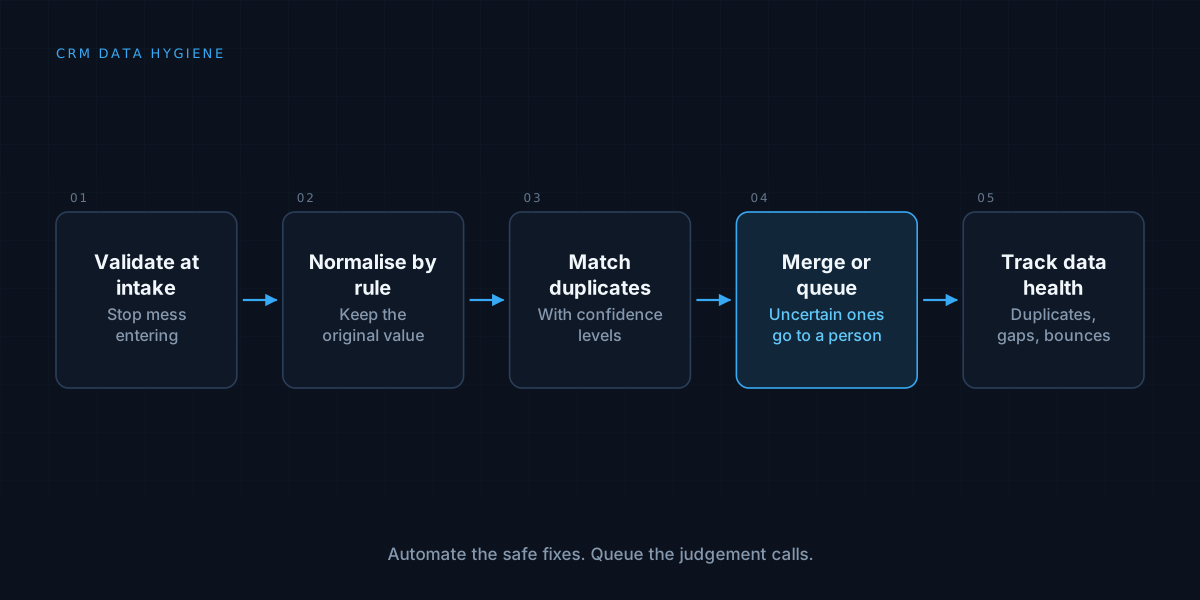
The cheapest data to clean is data that never gets dirty. Validation and standardisation at the point of entry prevents a great deal: required fields, dropdowns instead of free text, format checks on emails and phone numbers, and a duplicate check when a new record is created.
Imports and integrations deserve the same care, because they are where bulk mess arrives. Apply the same normalisation to anything entering the system, whatever its source.
Normalise with rules
Many problems have mechanical fixes. Standardise country and state values, format phone numbers consistently, trim whitespace, fix capitalisation, and map common title variants to a standard set. These are deterministic, safe, and can run continuously without review.
Keep the original value when you change something, so a rule that turns out to be wrong can be undone. Log what was changed and why.
Handle duplicates carefully
Detecting duplicates is the easy part. Deciding what to do about them is where mistakes are expensive, because a wrong merge destroys data and is hard to reverse.
Use matching rules with confidence levels. An exact match on a unique identifier such as an email address is strong. A fuzzy match on name and company is weaker. High-confidence matches can often be merged automatically, while lower-confidence ones should be queued for a person to confirm.
When merging, you have to decide which record wins and which values survive, which is the same problem described in data enrichment automation: when two sources disagree, someone has to define the precedence, and the disagreements are worth surfacing, not hiding.
Keep records current
Staleness needs signals. Bounced emails, returned mail, and unanswered outreach indicate a record may be out of date. Where you have a legitimate source of updates, enrichment can refresh titles and companies, subject to the reconciliation rules above.
Flag records that have not been touched or verified for a long time, and decide a policy for them: re-verify, archive, or remove. Respect privacy obligations here. Data you no longer have a reason to hold may need to be deleted, and records of people who opted out must stay opted out, a point that connects to audit logs and compliance.
Make the automation safe to run repeatedly
A clean-up job that runs on a schedule will run many times over the same records. It must be idempotent: running it again on already-clean data changes nothing, and running it twice by accident does no harm, in the sense described in idempotent automation.
Run it in a way that can be previewed. A dry-run mode that reports what would change, before changing it, is invaluable when you introduce a new rule.
Show people what is happening
Automation that silently rewrites customer records makes people nervous, and rightly. Keep a visible change history on each record, and a summary of what the clean-up did: how many records were normalised, how many merges were made, how many were queued for review. A sudden spike in any of these is worth investigating, as it usually means something upstream changed.
Measure data health
Track a few simple numbers over time: the duplicate rate, the share of records missing key fields, the bounce rate on emails, and the share of records verified recently. These tell you whether quality is improving or sliding, and they show whether a change in a form or an integration helped or hurt.
When a simple approach is enough
A small CRM with a few hundred records and one or two users may need nothing more than disciplined entry and an occasional manual check. The investment pays off as volume grows, as more people and systems write to the CRM, and as more automation depends on its accuracy. Start with intake validation and the mechanical fixes, since they remove most of the mess for the least risk.
We build the data pipelines that keep customer records trustworthy. See how we approach workflow automation, or read about the spreadsheet ceiling.